


When an SSL/TLS certificate nears the end of its validation period, OpenSRS reissues it automatically through the issuing certificate authority (CA). This article explains how automatic reissuance works for the three CAs available through OpenSRS — DigiCert/GeoTrust, Sectigo (Comodo), and Actalis — and how to retrieve a reissued certificate through the API.
How reissuance fits into your certificate's lifecycle
Certificate authorities require domain validation to be refreshed periodically during a certificate's active term, not just at initial issuance. OpenSRS handles this automatically: as a certificate approaches its next validation deadline, the issuing CA reissues it using the domain validation (DV) method already on file, and delivers the new certificate to the technical contact on the original order.
Reissue timing and notification details vary by CA — see the table below.
The timeline below shows this lifecycle for a one-year order, using DigiCert/GeoTrust and Sectigo's schedule as the example. Actalis follows the same six stages, but its reissue window opens 15 days later.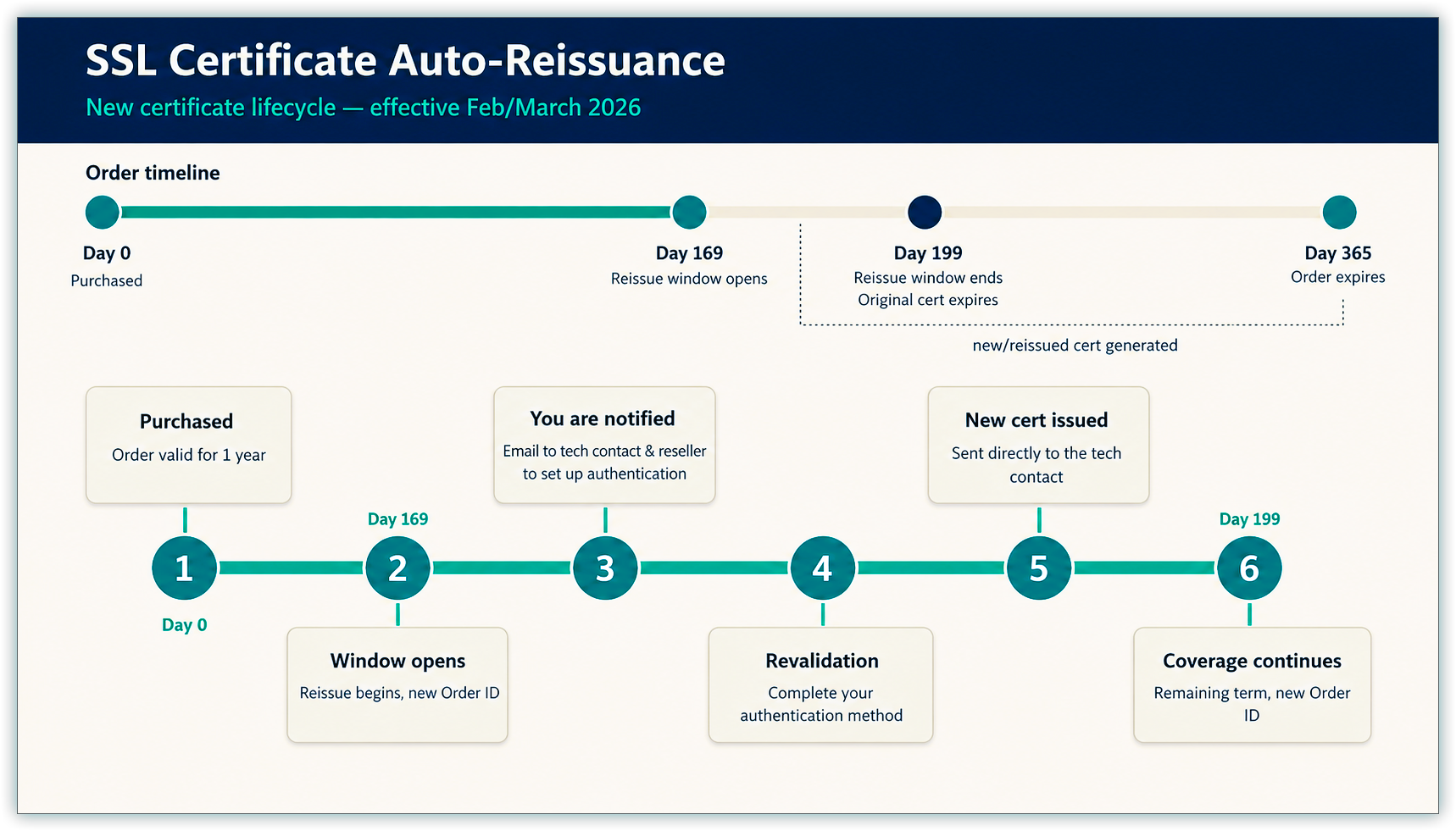
Before you begin
- A valid technical contact email address on the original certificate order. OpenSRS delivers reissuance notices and reissued certificates to this address.
- A valid reseller email address, if you're reissuing a Sectigo (Comodo) or Actalis certificate. OpenSRS sends File/DNS setup details for the reissuance to this address in addition to the technical contact.
- Your certificate's Domain Validation (DV) method (email, FILE, or DNS). The reissued certificate retains the same DV method as the original order.
- API access, if you want to retrieve order details or the reissued certificate programmatically.
Reissue timing and notifications
| Certificate authority | Reissue window opens | Reminder/confirmation sent to |
|---|---|---|
| DigiCert/GeoTrust | 30 days before the certificate's validation expiration date (original validation start date + 169 days) | Technical contact email on the original order (sent by DigiCert) |
| Sectigo (Comodo) | 30 days before the certificate's validation expiration date (original validation start date + 169 days) | Technical contact and reseller email addresses, with File/DNS setup details (sent by OpenSRS) |
| Actalis | 15 days before the certificate's validation expiration date (original validation start date + 184 days) | Technical contact and reseller email addresses, with File/DNS setup details (sent by OpenSRS) |
Estimating your reissue window
Reissue windows open a fixed number of days after a certificate's domain validation start date — 169 days for DigiCert/GeoTrust and Sectigo, 184 days for Actalis. Since validation usually completes within a few days of purchase, you can use the table below to tell customers roughly when to expect reissue activity, without looking up each order individually.
| Certificate validated in… | DigiCert/GeoTrust or Sectigo: window opens around… | Actalis: window opens around… |
|---|---|---|
| January | July | July |
| February | August | August |
| March | August | September |
| April | October | October |
| May | October | November |
| June | December | December |
| July | December | January |
| August | January | February |
| September | March | March |
| October | April | April |
| November | May | May |
| December | June | June |
These months are estimates, not exact dates — the 169/184-day count runs from the validation start date, which can trail the purchase date by a few days if DV wasn't completed immediately. For an exact date on a specific order, add 169 days (DigiCert/GeoTrust, Sectigo) or 184 days (Actalis) to that order's validation start date, or retrieve the order with GET_ORDER_INFO.
Completing domain validation for a reissued certificate
Your DV method carries over from the original order, so you generally don't need to choose it again.
- If your original DV method was email, the approver email address already on file receives a link to approve the reissued order.
- If your original DV method was FILE or DNS, you need a new DCV (Domain Control Validation) token to validate the reissued order.
- For Sectigo (Comodo) and Actalis, the new DCV token information is included directly in the reissue confirmation email. You can also retrieve it using the existing
GET_ORDER_INFOAPI call. - For DigiCert/GeoTrust, use the existing
GET_ORDER_INFOAPI call to retrieve the new DCV token, or look it up in RCP when you query the order.
- For Sectigo (Comodo) and Actalis, the new DCV token information is included directly in the reissue confirmation email. You can also retrieve it using the existing
Receiving the reissued certificate
Once domain validation completes, OpenSRS reissues the certificate and sends it to the technical contact email address from the original order. The reissued certificate is also available via the GET_CERT API call.
Note: For Actalis reissuances, the approver email is used solely for DV validation — it doesn't receive the reissued certificate.
Retrieving order details and certificates via API
| To do this | Use this API call |
|---|---|
| Retrieve the new DCV token or other order details for a pending reissuance | GET_ORDER_INFO |
| Retrieve the reissued certificate | GET_CERT |
Note: Your OpenSRS Order ID stays the same throughout the certificate's lifecycle, across all three CAs. The underlying Supplier Order ID also stays the same for DigiCert and Sectigo reissuances — but Actalis assigns a new Supplier Order ID every time the certificate is reissued. Plan for this difference if you track orders by Supplier Order ID.
Next steps
- Confirm your technical contact and reseller email addresses are current, especially for Sectigo (Comodo) and Actalis certificates, since File/DNS setup details are sent there.
- Update your order tracking for Actalis certificates if you rely on Supplier Order IDs, since a new one is assigned on every reissuance.
Questions? Contact OpenSRS Support.